Nyyon · Blog
Agent Experience (AX): Your Next Customer Can't See Your UI
Agent Experience is how easily an AI agent can sign up, authenticate, act, and recover from errors on a product without a human stepping in.
Agent Experience, or AX, is how easily an AI agent can use your product on behalf of a human. The next customer reading your docs is not a person. It is an agent, and it does not have the patience to guess. AX is the discipline of building products so an autonomous agent can sign up, authenticate, act, and recover from errors without a human stepping in to translate. If UX was the last decade's battleground, AX is the one being fought now, and most products are losing it without noticing.
Build for eyes, hope agents cope
Almost every product today is built for a human with a mouse and a monitor. The signup flow assumes someone reads the marketing copy, clicks through a modal, solves a CAPTCHA, and pastes an API key into a settings page they found by hovering over a gear icon.
That works when a person is driving. It breaks the moment an agent is.
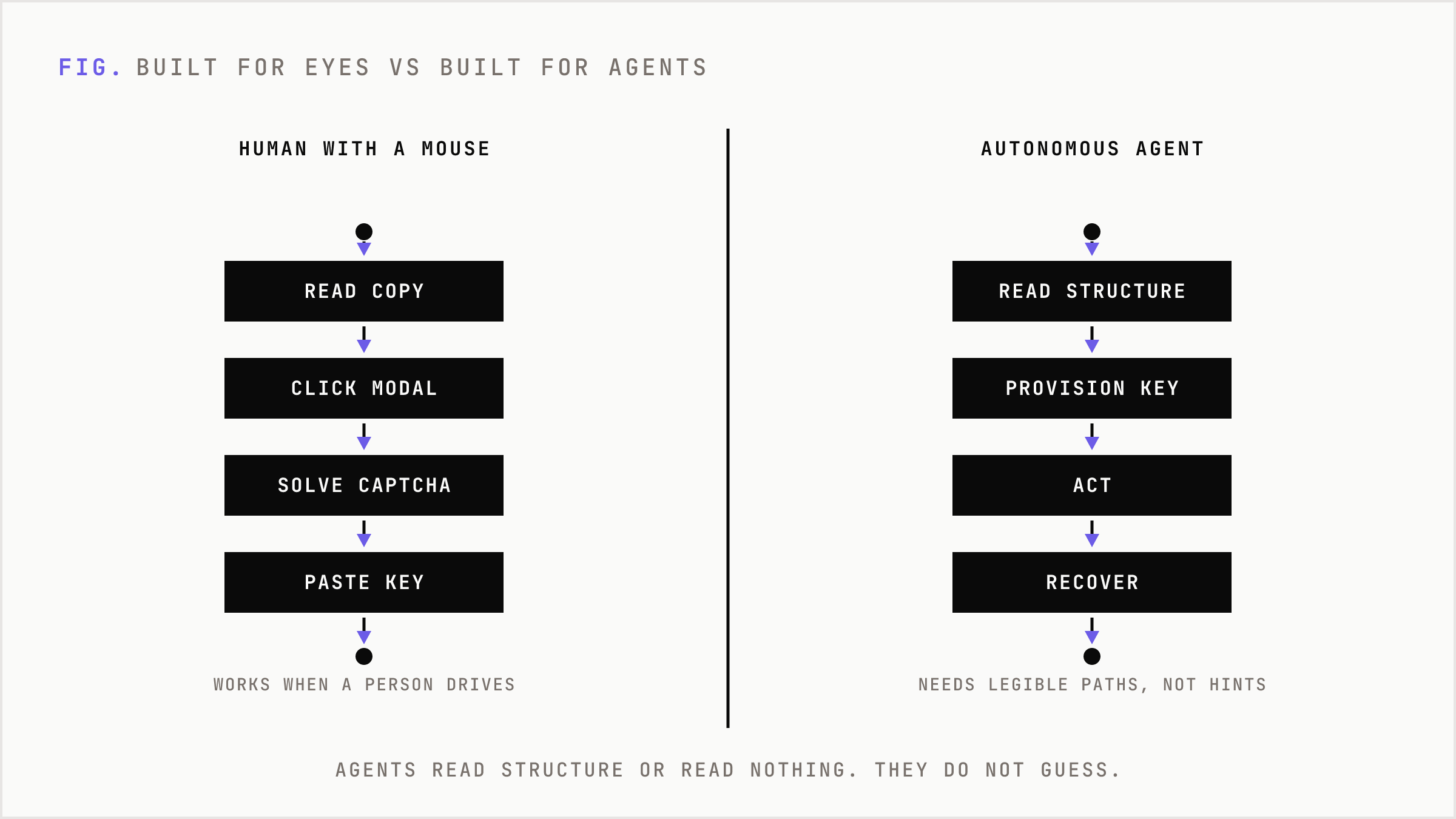
An agent does not see your hero image. It does not intuit that the blue button means continue. It reads structure, or it reads nothing. When it hits a CAPTCHA, it stops. When your error message says "Something went wrong," it has no idea whether to retry, wait, or give up. When your docs bury the auth flow inside a video walkthrough, the agent walks away.
The dominant pattern treats agents as a fringe case, a robot that occasionally pings your API. That framing is already wrong. Agents are becoming the primary way work gets initiated. Someone tells their assistant "set up email sending for this project," and the assistant goes shopping. The product with the best AX wins that job. The product with a pretty UI and hostile plumbing does not get considered.
What Agent Experience actually is
Agent Experience is the quality of the interaction between an autonomous agent and your product across discovery, authentication, action, and error recovery.
It is not a chatbot bolted onto your site. It is not an AI feature. It is the machine-readable surface area of everything you already ship: your docs, your API, your onboarding, your errors, your data formats.
Think of it as UX for a user who cannot see, cannot guess, and cannot ask a support rep for help. That user reads text, follows explicit instructions, and needs every path to be legible without inference. Everything you left ambiguous for a human to figure out is a wall the agent hits at full speed.
The uncomfortable part: good AX exposes how much of your product only worked because humans filled the gaps. The half-documented endpoint. The onboarding step everyone just knows. The error a support person explains over chat. Humans papered over all of it. Agents will not.
AX is a workflow problem, not a feature
Here is where we part ways with the checklist crowd. Improving AX is not a list of features to add. It is a decision about which parts of your product an agent must be able to complete end to end without a human, and then owning the gap until that path actually works.
We call this the legible-path principle.
The legible-path principle means picking the one workflow an agent most needs to complete, then removing every point where the agent would have to guess, wait for a human, or fail silently.
Applied to an email API, the legible path is this: an agent should read the docs, create an account or key, verify a domain, and send a test message, all without a person opening a browser. Every step in that chain either survives contact with an agent or it does not. There is no partial credit. A signup that works and a domain verification that requires clicking a link in an inbox means the agent stalls at step three and your AX is zero.
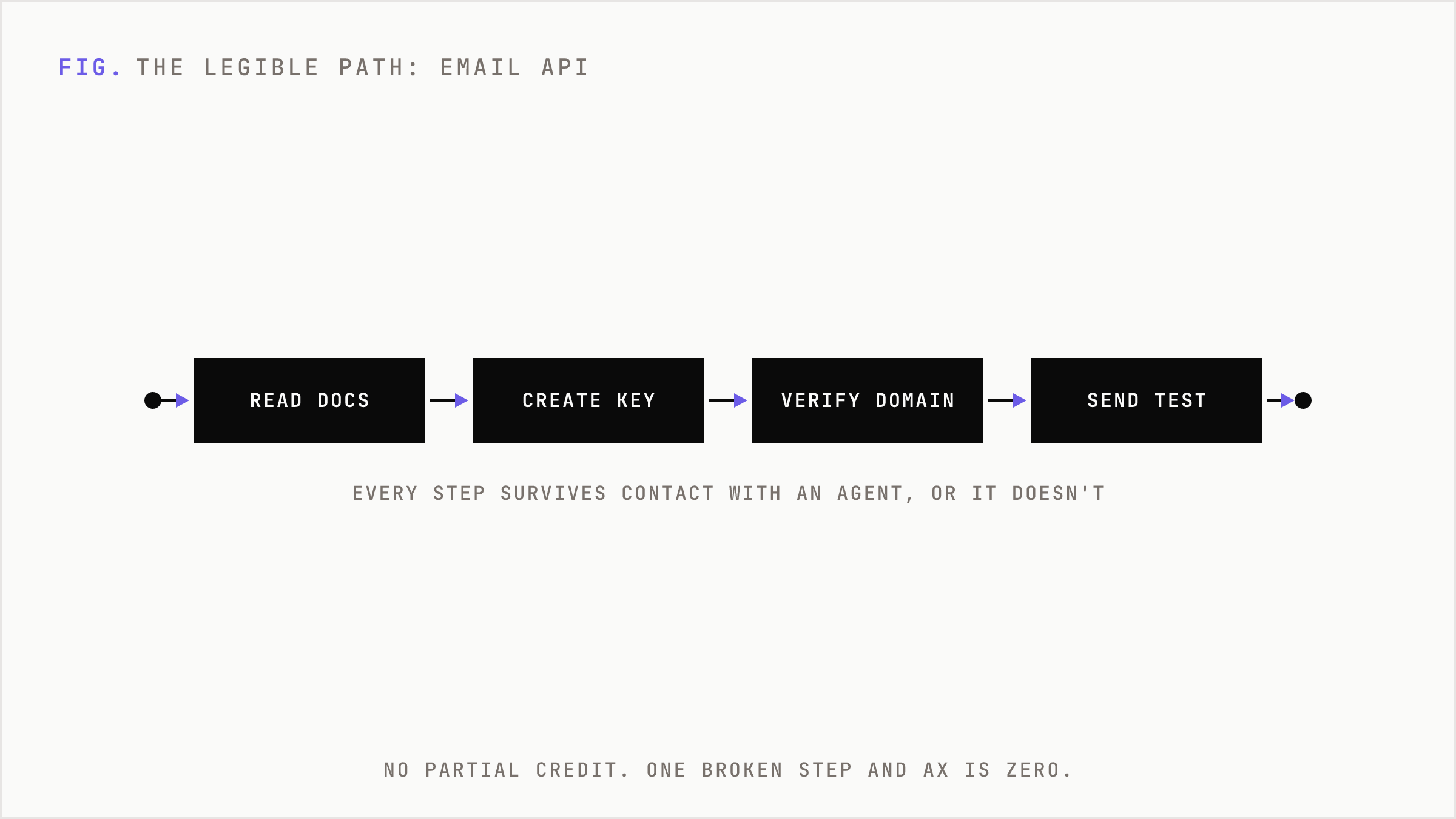
Most teams optimize the parts that demo well. The AX-serious team optimizes the part that breaks.
How to improve AX in practice
Concrete moves, in the order they pay off.
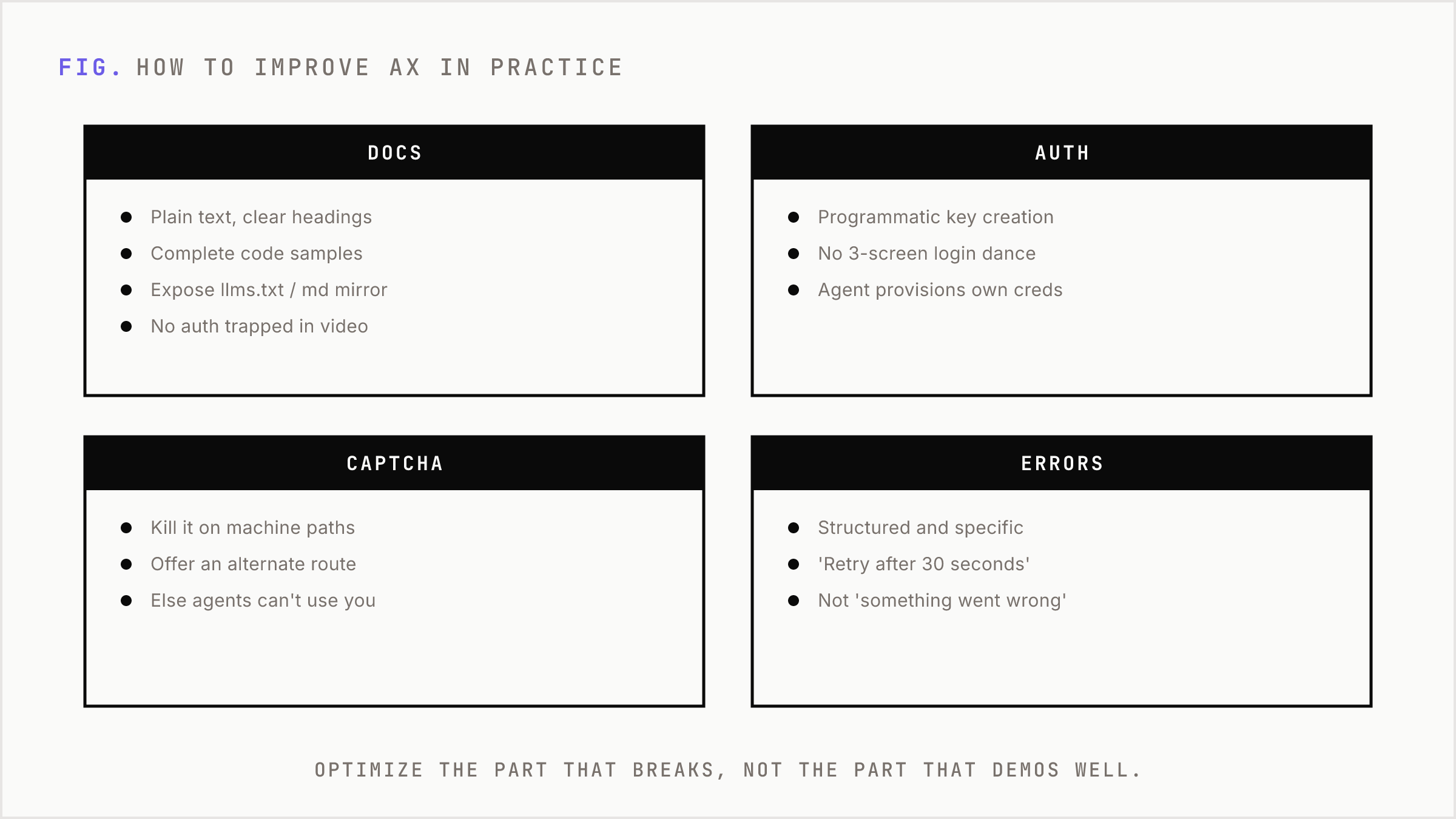
Write docs an agent can parse. Plain text, clear headings, complete code samples, explicit auth steps. No critical instruction trapped in a video or a screenshot. If the only way to learn your auth flow is to watch a two-minute clip, the agent never learns it. Expose an llms.txt or a clean markdown mirror of your docs so the agent gets structure, not rendered marketing HTML.
Make authentication programmatic. Programmatic API key creation beats a settings page every time. If a human has to log in, navigate three screens, and copy a token, the agent is dead on arrival. The best AX lets an agent provision its own credentials through an API call.
Kill the CAPTCHA on machine paths. A CAPTCHA is a wall built specifically to stop the thing you now want to serve. If your signup gates behind one, offer an alternate machine path. Otherwise you have decided, on purpose, that agents cannot use your product.
Return errors an agent can act on. "Something went wrong" is useless. "Rate limit exceeded, retry after 30 seconds" tells the agent exactly what to do next. Structured, actionable, specific error responses are the difference between an agent that recovers and one that abandons the task.
Expose the workflow, not just the endpoints. An agent needs to know the sequence: verify domain before sending, confirm before charging. Document the order of operations, not just the individual calls. This is the same reasoning behind why an agent needs a plan and not a pile of unstructured goals. Sequence is what turns capability into completion.
One consequence, made concrete
Picture two email APIs. Both have solid features. Both have good uptime.
Product A has clean docs, programmatic key creation, structured errors, and a domain verification flow an agent can complete via API. Product B has a slick dashboard, a video onboarding, a CAPTCHA on signup, and errors that say "contact support."
A developer tells their coding agent: "Add transactional email to this app." The agent reads both. It completes Product A's full path in one run, from docs to a sent test message. It hits Product B's CAPTCHA and reports back: "I could not complete signup, a human needs to do this manually."
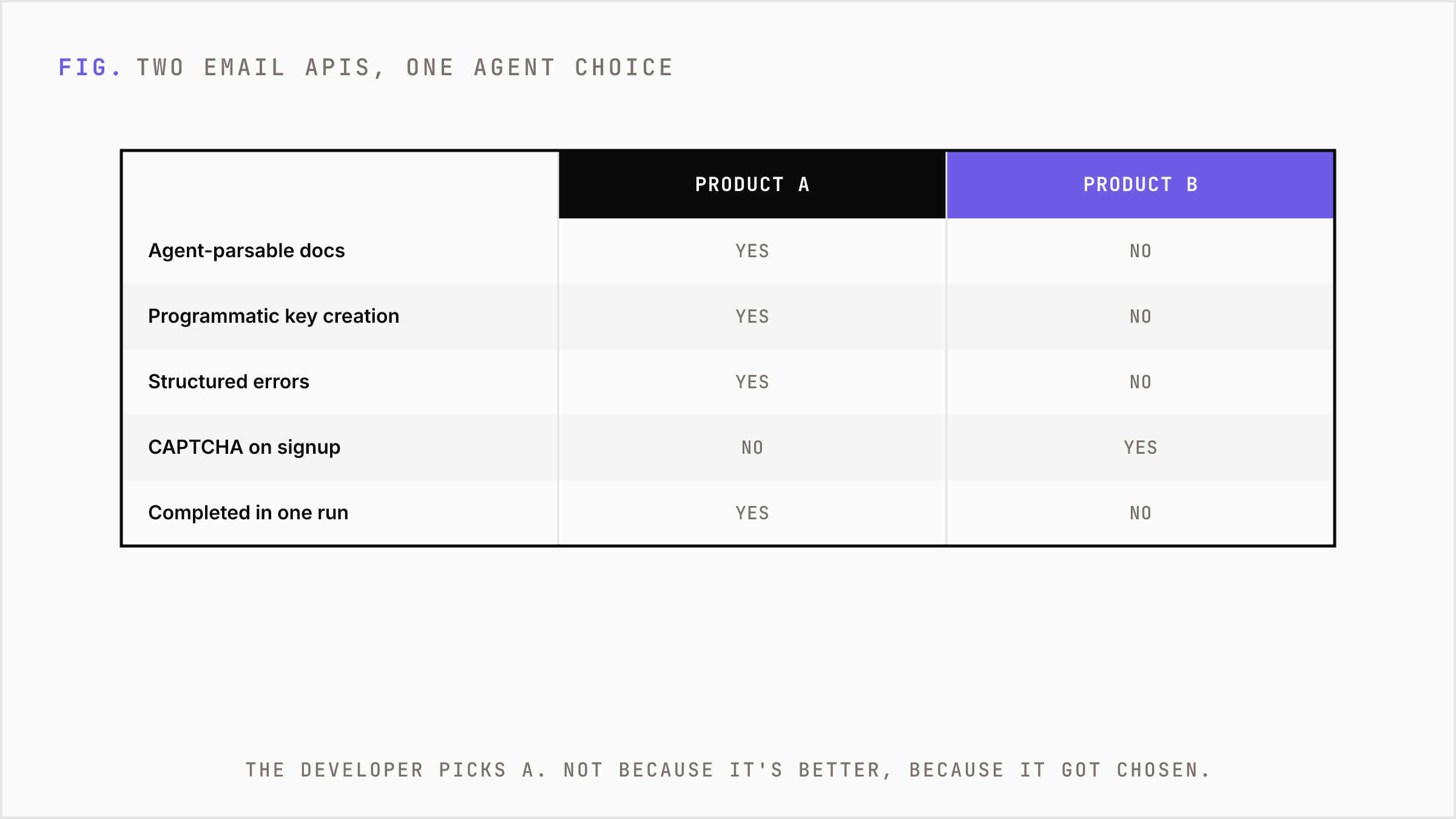
The developer picks A. Not because A is a better product. Because A got chosen and B got skipped. That is the entire game. When the buyer is an agent, being un-completable is the same as not existing.
What changes, and the honest trade-offs
If you take AX seriously, your priorities shift. Docs stop being an afterthought and become a product surface with real ownership. Error design becomes engineering work, not copywriting. Onboarding gets a second path that assumes no human is watching.
What stays the same: your UI still matters. Humans have not vanished. The trade-off is not agents instead of people. It is that you now serve two users with different needs, and the agent has less tolerance for ambiguity than the human ever did.
The real cost is discipline. Good AX means fewer places where a human quietly rescues a broken flow. That forces you to fix the flow. Some teams will find that most of their product was held together by human patience, and closing those gaps is more work than shipping the next feature. That is the gap. That is also the job.
The products that win the agent era will not be the ones with the most AI features. They will be the ones an agent can actually finish using, without asking for help.
If you have a problem, if no one else can help, and if you can find them, maybe you can hire Nyyon.